
Articles
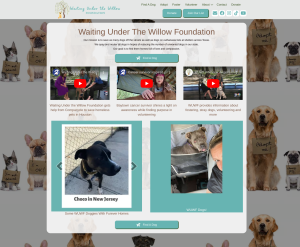
Desktop Solutions creates website for Houston Dog Rescue
Desktop Solutions Software has created a website for the Houston Dog rescue, Waiting Under the Willow Foundation. The website at https://wuwf.org includes a number of features including a database of adoptable dogs, donation forms, videos, photos and information about the foundation and more. Using the website, volunteers can submit interest, donations may be made in…


Ransomware: A New Security Threat to Your Site
IMPORTANT ALERT ABOUT RANSOMWARE AND YOUR SITERansomware, once a menace mainly for consumers, has recently become a significant threat to business websites, even small ones. Please read the following important notice about this new risk and our recommendations for mitigating it. WHAT EXACTLY IS RANSOMWARE?Ransomware is a form of malware that encrypts or hides a…

Working at Home: Tips on Maximizing Your Productivity
We’ve been working remotely since 2007, so we’d like to share some tips on making your work-at-home experience as productive as possible. Hardware: Most people have a laptop that they can use in any room of the house, but some people will need additional hardware like pcs, printers and scanners for team members to work…

Is your website ADA compliant?
Due to some recent court decisions in California and Florida, we are advising that all clients consider making their websites ADA compliant. Although no definitive regulations exist yet, two of our clients have received letters from attorneys seeking damages on behalf of blind clients who cannot access their websites. According to the legal experts we…

Why https?
Recent changes in Google Chrome might mean you should purchase a secure certificate to prevent your search engine rankings from declining. What Is HTTPS? The “s” at the end of the “http” part of a URL means the website is secure. When installed on a web server, an SSL certificate activates a secure protocol that…

The Power of Video Marketing
Why Video Marketing? Because of its ability to inform, entertain, motivate and inspire, video is one of the best ways to build your brand, engage new customers and improve your search engine optimization. With approximately 500 million viewers per month, YouTube is currently the second largest search engine on the planet proving that customers like…

Hacking & Web Security – What You Need to Know
Given all the news of late about hacking and its potentially harmful effects, we thought outing together a useful guide to hacking would be helpful to our clients. In computer networking, hacking is any technical effort to manipulate the normal behavior of network connections and connected systems. A hacker is any person engaged in hacking.…

New Logo and Website for Long Island Metro Business Action
Desktop Solutions is proud to announce the launching of a new online brand for LIMBA, the Long Island Metro Business Action. LIMBA’s new look includes an redesigned logo and clean, mobile-friendly website. The new site is designed to highlight LIMBA’s great line-up of government, education, business, scientific, and environmental leaders that present their ideas to improve the quality…
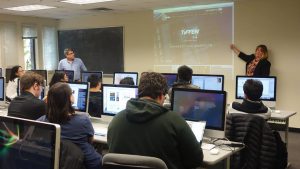
Desktop Solutions Lectures on Website Interface Design at Stony Brook
Thanks to professor Tony Scarlatos from Stony Brook Computer Science Department for asking Desktop Solutions’ Frank Imburgio and Lynellen Nielsen to guest lecture on web interface design. We were honored to speak with seniors in the multimedia lab about user interface best practices and real world design challenges.